LMC8.4
Screenshots
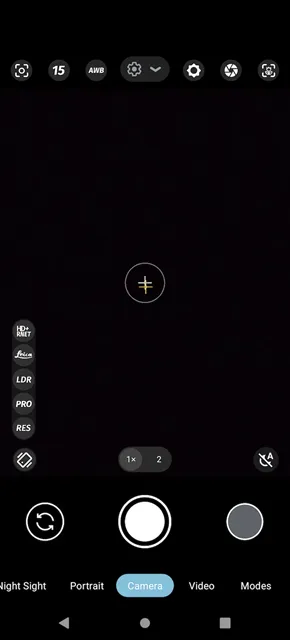
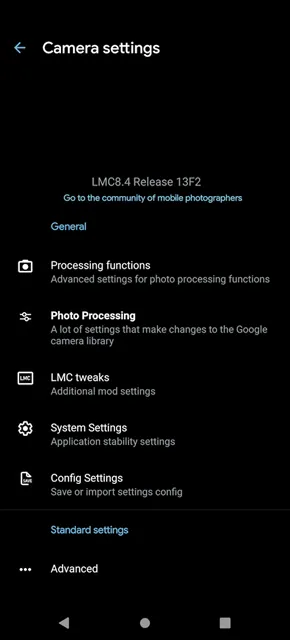
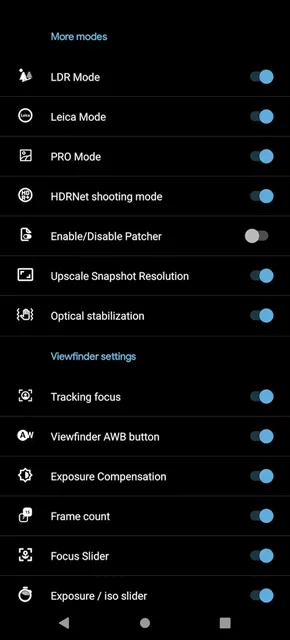
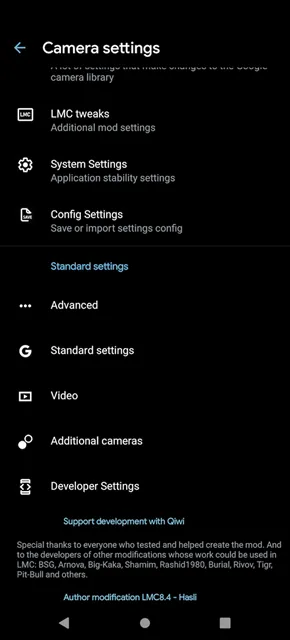
LMC8.4 changes how you take photos with your mobile device. Many people want high-quality pictures from their regular smartphones. However, default camera apps often limit your hardware capabilities. This app solves that specific problem completely. It modifies the famous Google Camera software for broader compatibility. Therefore, you can access premium imaging tools on various phone models. You do not need an expensive flagship phone anymore. Instead, you can install this app to enhance your mobile photography.
This piece of software provides professional features for regular mobile users. It captures amazing details in different lighting conditions. Consequently, your daily snapshots look much more professional. Furthermore, anyone can learn to use the app quickly. The layout feels familiar and straightforward. You do not need prior photography training to get good results. The automated systems handle difficult lighting conditions effortlessly. Because of this efficiency, users love mobile shooting even more. It transforms an average phone camera into a powerful tool.
What is LMC8.4?
LMC8.4 is a modified version of the official Google Pixel camera software. A talented developer named Hasli created this unique project. He wanted to give pixel-like photo quality to non-pixel phone users. Therefore, he unlocked the advanced computational photography algorithms for everyone. Regular stock cameras often over-smooth skin tones. They also compress image data heavily. However, LMC8.4 processes raw image data differently. It preserves natural textures and true colors in every shot.
The app works on many mid-range and budget phones. Because of this compatibility, millions of photography fans download the tool. It gives your smartphone camera a complete software upgrade. You can capture professional-grade images without changing your physical camera hardware. Furthermore, the user interface remains simple and easy to navigate. Anyone can start using the tool within a few minutes.
Additionally, this custom software bypasses the generic limitations set by phone manufacturers. Many companies restrict their camera software to encourage phone upgrades. This mod breaks those artificial restrictions immediately. Consequently, your current phone camera performs like a brand-new device. You will experience better color accuracy and superior dynamic range. It represents the ultimate software solution for budget-conscious mobile photographers.
Advanced Features of the App
This camera app contains many functions that improve your photography experience. You can access tools that stock cameras do not offer.
Here are the main features of the app:
- Advanced HDR+ Mode: This feature captures multiple frames at different exposure levels. Then, it combines them into a single detailed image. Therefore, you get perfectly balanced highlights and shadows.
- Superior Night Sight: Low-light photography often challenges small mobile sensors. However, this mode brightens dark scenes without creating digital noise. You can capture clear evening landscapes easily.
- Natural Portrait Blur: The app separates the main subject from the background accurately. Consequently, the background blur looks realistic and professional.
- Multiple Lens Support: You can easily switch between different physical lenses. The app supports wide-angle, telephoto, and macro sensors.
- Manual Camera Controls: Professional users can adjust camera settings manually. For example, you can control the shutter speed and ISO.
Furthermore, the app includes special color profiles like Leica mode. This mode adds a classic artistic look to your pictures. It enhances contrasts and deepens shadows for dramatic effects. Therefore, you can create moody street photography without extra editing apps. The app also supports high bit-rate video recording. You can capture stable and sharp videos during family events. It provides a complete multimedia package for your daily needs.
Step-by-Step Guide to Install LMC8.4
Installing LMC8.4 requires a few simple steps because it is a third-party APK file. You will not find it on official app stores. However, the installation process is safe and fast. Follow this clear guide to install the tool properly.
- Download the APK file:
- Visit our secure download section. Then, click the download button to get the latest APK file.
- Enable Unknown Sources:
- Open your device settings menu. Go to security or privacy settings. Then, allow installations from unknown sources.
- Locate the downloaded file:
- Open your mobile file manager app. Find the downloaded package in your downloads folder.
- Install the app:
- Tap on the file to begin installation. Confirm the prompts on your screen. Then, wait for the process to complete.
- Launch and grant permissions:
- Open LMC8.4 from your app drawer. Grant necessary permissions for the camera, microphone, and storage.
After completing these steps, you can open the camera app immediately. Make sure you clear your phone memory before launching it for the first time. This action ensures smooth initial performance. If the app closes unexpectedly, restart your device. A quick reboot fixes most initial setup glitches.
Furthermore, you should check for configuration files matching your device. Using a proper configuration file guarantees the best stability. It helps the software communicate perfectly with your specific camera hardware chips. Therefore, take your time during the setup process to avoid errors.
Understanding XML Config Files
XML config files are special settings files for this advanced camera app. These files contain pre-configured settings made by expert photographers. Different mobile phone models have different camera sensors. Therefore, a single setup does not work perfectly for every device. These custom files solve this problem. They tune the software options specifically for your phone hardware. For example, some files enhance colors for sunset pictures. Other files optimize the system for extreme low-light conditions.
You can easily download these configurations online. Then, you must place them inside a specific folder. Create a folder named “LMC8.4” in your internal storage. Put the downloaded XML files inside this new folder. Open the camera app afterwards. Double-tap the black space around the shutter button. A menu will appear on your screen. Select your desired configuration file from the list. Then, click the import button. The app will reload instantly with the new optimized parameters.
Consequently, you do not need to adjust complicated sliders yourself. The config file does all the heavy work automatically. Photography experts spend hours fine-tuning these parameters for specific sensors. By importing their files, you instantly gain their expertise. You can save multiple files for different occasions. For instance, keep one file for sunny outdoor trips. Keep another file for indoor family dinners. This flexibility lets you adapt to any shooting condition instantly.
Why You Need LMC8.4 on Your Phone
Many users wonder why they should replace their factory camera software. The main reason is the significant jump in picture details. Factory cameras often compress files too much to save storage space. However, this reduction ruins fine details like hair or leaves. LMC8.4 utilizes advanced processing to protect these crucial details. Therefore, your pictures look sharp even when you zoom in closely.
Furthermore, this app handles difficult lighting situations much better than standard software. Shadows remain clear and bright. Highlights do not become overexposed or blurry. You can take beautiful photos against direct sunlight. Additionally, the software color science looks highly realistic. It avoids the fake, oversaturated colors common in modern phone processing. Instead, you get deep tones and accurate skin colors.
Photography enthusiasts love this natural look. It gives your mobile pictures a premium feel. For these reasons, installing LMC8.4 remains a top recommendation for smartphone users. It helps you maximize the true power of your phone camera lenses. You will notice the difference immediately in your first photo session.
Additionally, the community around this app provides continuous support. Developers update the software regularly to fix bugs. Users share new configurations every week. Therefore, your camera performance keeps improving over time. You do not get this level of dedication from standard phone manufacturers. It represents a long-term upgrade for your mobile device.
Conclusion
Upgrading your mobile camera setup does not require buying an expensive new smartphone. Instead, installing LMC8.4 provides a smart and free alternative. This app unlocks the hidden capabilities of your existing camera hardware. It offers advanced computational tools like HDR+ and Night Sight to everyone. Therefore, you can capture professional photos easily on a budget.
The inclusion of XML config files makes customization effortless for beginners. You can apply expert settings with just a double tap. However, you must remember to download the app from safe sources. Always protect your device from corrupted files. Follow our guide to ensure a smooth and secure installation process.
In conclusion, this camera app completely redefines budget mobile photography. It bridges the gap between affordable phones and luxury flagships. Start your photography journey today by downloading the package file. You will amaze your friends with stunning, clear, and vibrant pictures.